🎙 AI COACH · VOICE

How to use the AI coach (voice)

The AI coach (voice) lets you do the exercises in "Today's Exercise & Breathing" while talking with the AI coach. Without watching the screen all the time, the coach guides you by voice through setup → how to → each repetition → the final check. You can reply in everyday words such as "OK" or "done" (available in Japanese, English, Korean and Traditional Chinese).

BEFOREBefore you start

  1. PrepareAn AI coaching subscriptionLog in with your subscribed account. There is no extra fee for the AI coach (voice).
  2. PrepareA phone or PC with a microphoneUse Safari on iPhone and Chrome on Android. The microphone may not work in a page opened inside apps such as LINE or Instagram.
  3. PrepareEarphones with a mic (recommended)We recommend earphones with a microphone so you can talk with your phone. Your replies are picked up more reliably. With the speaker, stand the phone up in front of you and keep the volume low.
  4. PrepareIn front of a mirror (recommended)Exercising in front of a mirror lets you check that your shoulders are not rising and your neck is not tensing. Without a mirror, place your phone in front of you.
  5. PrepareA quiet placeIn a noisy place, the AI coach may pick up the surrounding sound and mistake it for your reply. Turn off the TV or music before you start.
  6. Prepare5B toolsBar, board, base trunk and B-TUBE. You can skip any exercise you do not have the tool for with "Skip today".
STARTHow to start (screen flow)

After measuring, this is the flow up to starting the first exercise (① Breathing: pose, B-TUBE breathing, gel).

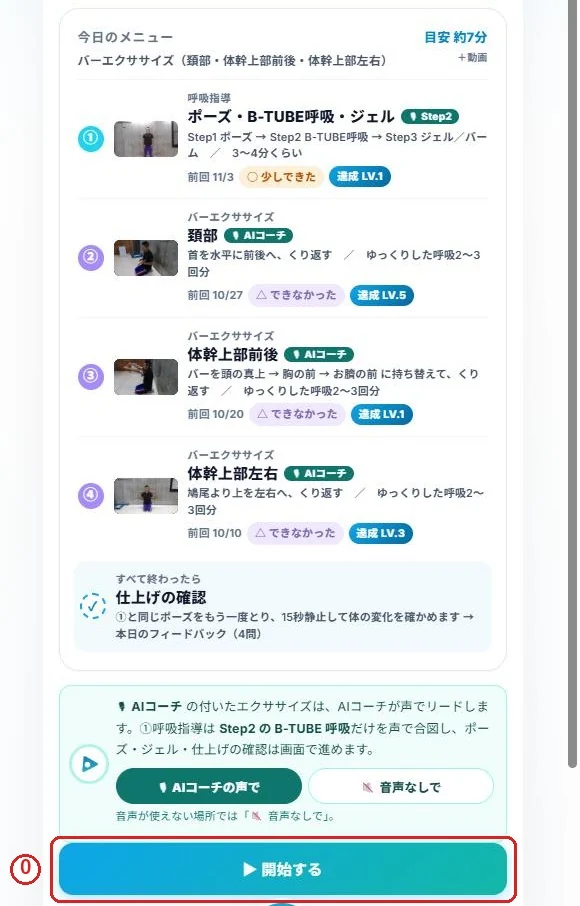
Today's menu — After measuring, today's exercises are listed. Exercises marked "🎙 AI coach" are led by the AI coach by voice. Tap "▶ Start".
⓪ Today's menu
After measuring, today's exercises are listed. Exercises marked "🎙 AI coach" are led by the AI coach by voice. Tap "▶ Start".
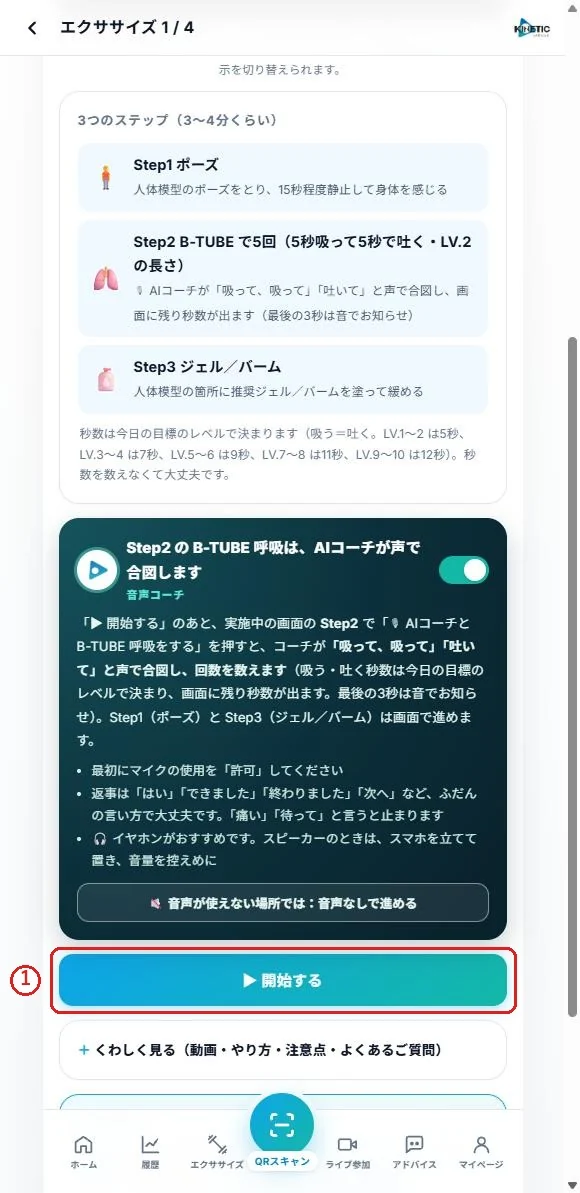
Pose, B-TUBE breathing and gel: explanation — Check what to prepare, the video and the three steps, then tap "▶ Start" at the bottom.
① Pose, B-TUBE breathing and gel: explanation
Check what to prepare, the video and the three steps, then tap "▶ Start" at the bottom.
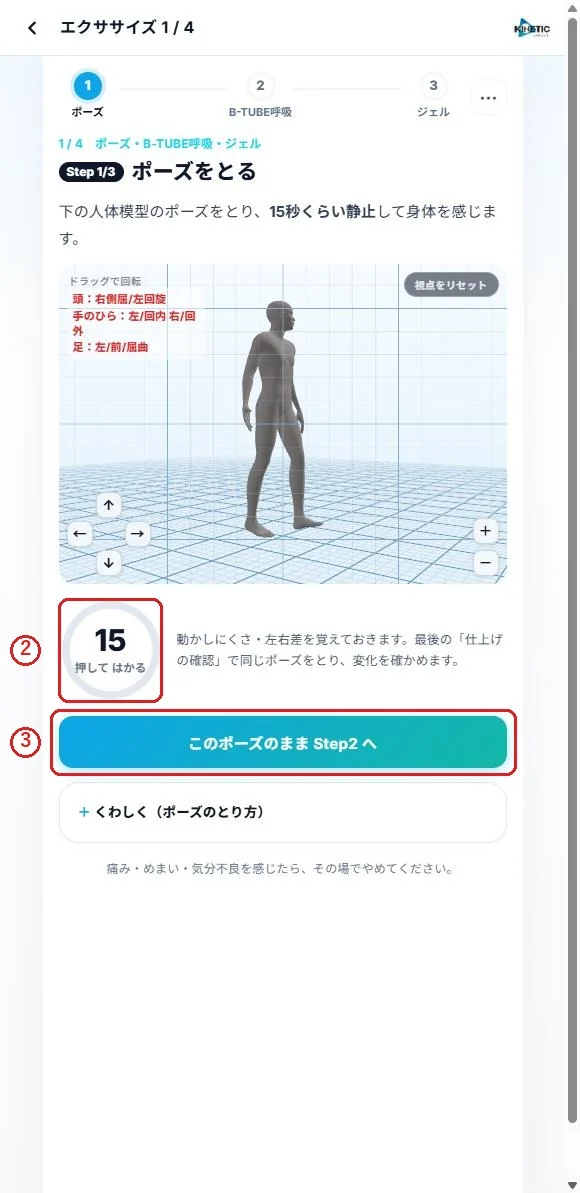
Step 1/3 Take the pose — Take the same pose as the body model and hold still for about 15 seconds. Tap the round "15" to time it. Then tap "Keep this pose → Step 2".
②③ Step 1/3 Take the pose
Take the same pose as the body model and hold still for about 15 seconds. Tap the round "15" to time it. Then tap "Keep this pose → Step 2".
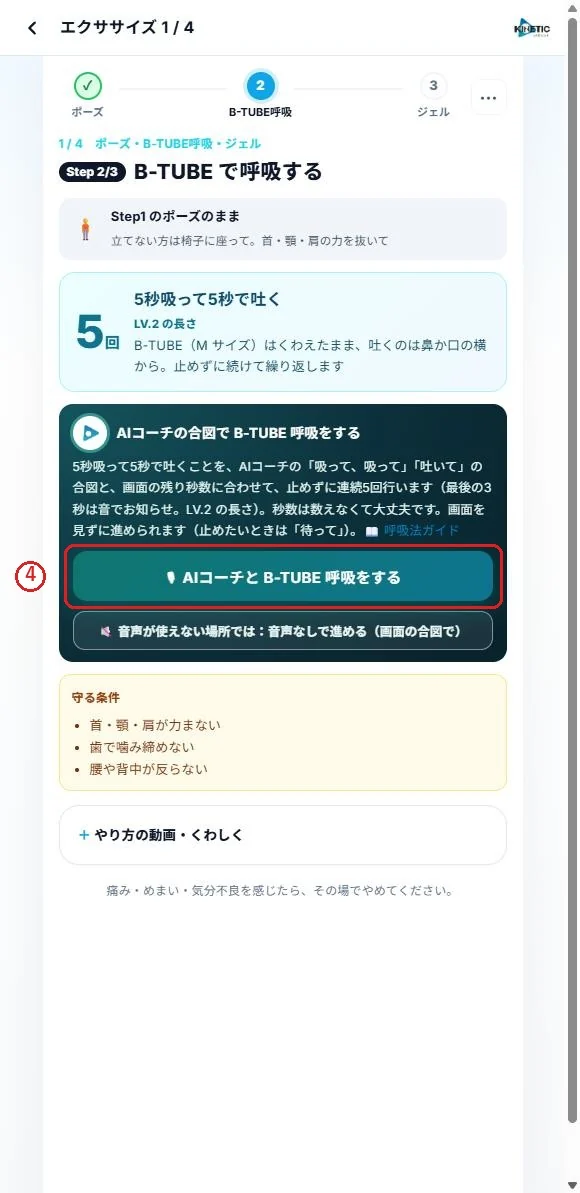
Step 2/3 Breathe with the B-TUBE — Tap "🎙 Do B-TUBE breathing with the AI coach" and the coach starts cueing you by voice.
④ Step 2/3 Breathe with the B-TUBE
Tap "🎙 Do B-TUBE breathing with the AI coach" and the coach starts cueing you by voice.
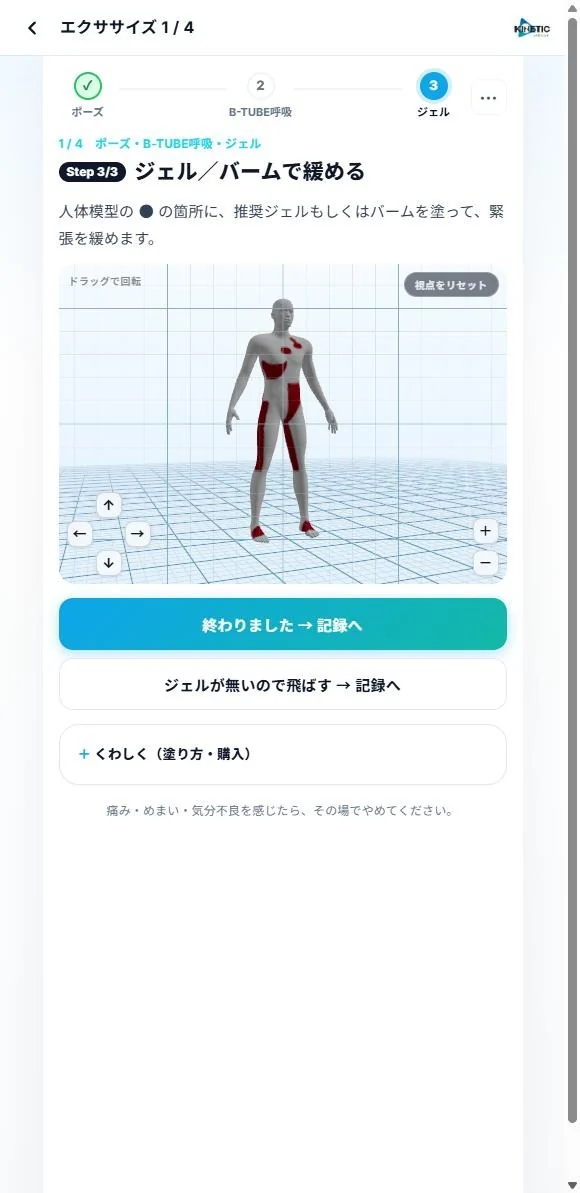
Step 3/3 Relax with gel / balm — Apply it to the ● spots and tap "Finished → record". You can skip this step if you have none.
Next Step 3/3 Relax with gel / balm
Apply it to the ● spots and tap "Finished → record". You can skip this step if you have none.

Screens are for illustration (sample data) and are shown in Japanese; in the app they appear in your display language. Click to enlarge.

  • After Step 3, you move on to the next exercise (② and later) and finally to the "Final check".
  • For exercise ② and later (bar, board, etc.), tap "🎙 Start with the AI coach" on the explanation screen to open the conversation screen. The coach starts talking; reply when the indicator at the top changes to "🎙 どうぞ話してください" (please speak).
  • When asked for microphone access the first time, tap "Allow".
  • You can also choose "Skip today" on each explanation screen.
i
You can switch between "🎙 With the AI coach" and "🔇 Silent mode" at any time with the buttons on the menu and the switch on the explanation screen.

B-TUBEB-TUBE breathing with voice cues

① Breathing has three steps, and only Step 2 (B-TUBE breathing) is done by voice. Step 1 (pose) and Step 3 (gel / balm) are done on screen.

  • The AI coach cues you by voice ("Breathe in, breathe in" / "Breathe out") and counts for you. Breathe in and out 5 times in a row without stopping.
  • The seconds are set by today's target level (inhale = exhale). You do not need to count.
  • The remaining seconds are shown in large numbers. The last 3 seconds are signalled with beeps.
  • To pause, say "wait" or tap "Wait (pause)". Say "OK" or tap "OK (continue)" to resume from that breath.
  • After the 5 breaths and the coach's closing words, you move to Step 3 automatically in 3 seconds.
Today's target levelInhale / exhale
LV.1–25 s / 5 s
LV.3–47 s / 7 s
LV.5–69 s / 9 s
LV.7–811 s / 11 s
LV.9–1012 s / 12 s

The conversation screen

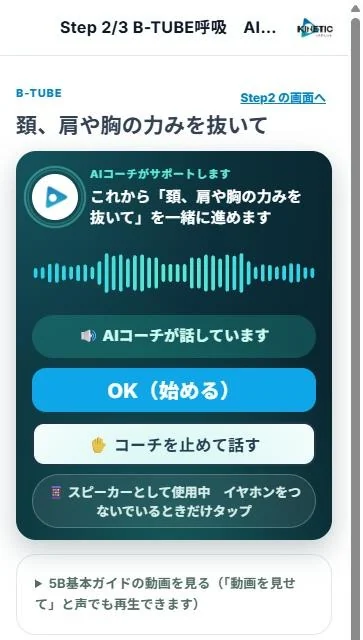
Greeting and explanation — "🔊 AIコーチが話しています" (the coach is speaking). To start before the explanation ends, tap "OK(始める)" (OK – start).
Greeting and explanation
"🔊 AIコーチが話しています" (the coach is speaking). To start before the explanation ends, tap "OK(始める)" (OK – start).
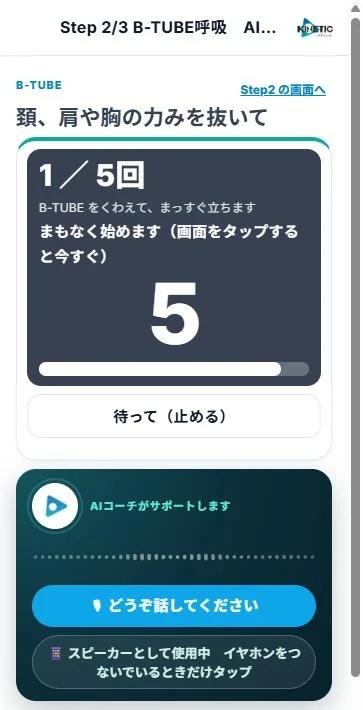
Ready countdown — Put the B-TUBE in your mouth and stand straight. It starts after a 5-second count (tap the screen to start right away).
Ready countdown
Put the B-TUBE in your mouth and stand straight. It starts after a 5-second count (tap the screen to start right away).
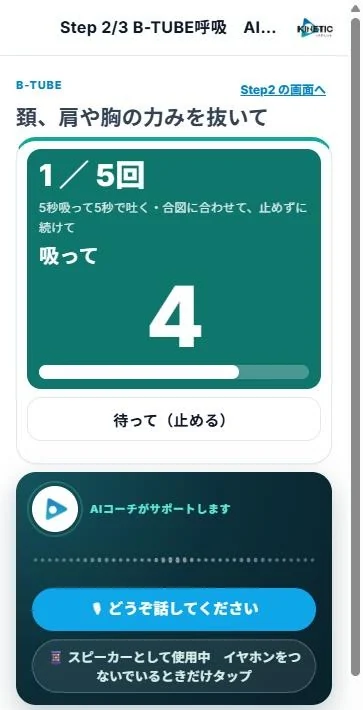
Inhale / exhale — "吸って" (breathe in) or "吐いて" (breathe out) is shown with the remaining seconds in large numbers and a bar.
Inhale / exhale
"吸って" (breathe in) or "吐いて" (breathe out) is shown with the remaining seconds in large numbers and a bar.
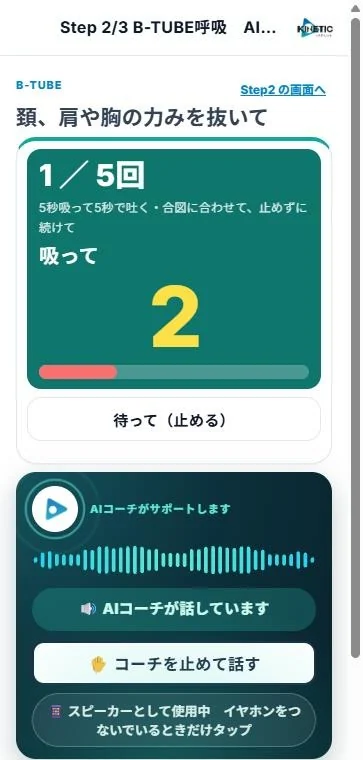
Last 3 seconds — The number turns yellow, the bar turns red, and you hear beeps.
Last 3 seconds
The number turns yellow, the bar turns red, and you hear beeps.
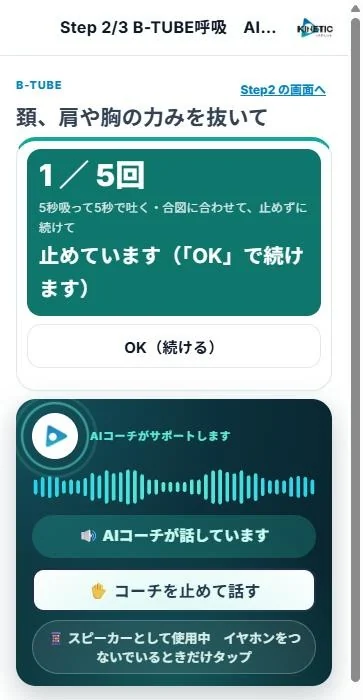
When paused — Say "wait" to pause. Say "OK" or tap "OK(続ける)" (OK – continue) to resume from that breath.
When paused
Say "wait" to pause. Say "OK" or tap "OK(続ける)" (OK – continue) to resume from that breath.

Screens are for illustration (sample data) and are shown in Japanese; in the app they appear in your display language. Click to enlarge.

VOICEWhat to say

Everyday words work. The reply that is recognized most reliably is "OK". When you are ready, when you want to start, and when you want to continue after a pause, just say "OK" if in doubt.

What you wantExamples
Ready / start"OK" (most reliable). "Yes", "Ready" also work
Finished a repetition"Done", "Finished"
Wait a moment"Wait", "Hold on", "Not yet"
Continue after a pause"OK"
Pain or feeling unwell"It hurts", "I feel dizzy", "I feel sick" → stops right away
Continue after stopping for pain"Continue" ("OK" does not resume). Or tap "続ける(楽になったら)" (continue when you feel better)
End the session"Finish", "That's enough"
Hear it again"One more", "Explain"
Skip the explanation"Skip"
Slower / faster pace"Slower", "Faster"
Stop the tips"No tips"
QuestionsJust ask, for example "How long should I breathe in?"
i
While the coach is speaking, your voice may not get through (especially with the speaker). Reply after the coach finishes and the indicator shows "🎙 どうぞ話してください" (please speak).

BUTTONSOn-screen buttons

When your voice does not get through, you can do the same things on screen. The conversation screen is currently shown in Japanese, so the Japanese labels are listed with their meaning.

Button / indicatorWhat it does
OK(進む)/OK(始める) (OK – next / start)Same as saying "OK". Stops the explanation and moves on
Wait (pause) / OK (continue)Pause and resume B-TUBE breathing
続ける(楽になったら) (continue when you feel better)Continue after stopping for pain or feeling unwell
✋ コーチを止めて話す (stop the coach and speak)Interrupt the coach and speak
完了回数 −/+ (completed count)Correct the count when it is wrong
🎧 イヤホンで使用中/📱 スピーカーとして使用中 (earphones / speaker)Shows how you are listening. Tap to switch if it is wrong
一時停止/再開する・マイクをミュート (pause / resume, mute mic)Pause the conversation or mute the microphone
🔇 Continue in silent modeLeave the conversation and continue with the steps on screen
ここでエクササイズを終了 (end the exercise here)End the conversation and move on
⚙ 音声設定 (voice settings)Length of the explanation, pace and so on

QUIETSilent mode

  • Where you cannot speak, such as on a train or late at night, choose "🔇 Where you cannot use sound: continue in silent mode".
  • Videos are muted and shown with subtitles, and you follow the steps on screen.
  • For B-TUBE breathing, tap "▶ Start (cue in 5 seconds)" and follow the countdown on screen and the beeps for the last 3 seconds.
  • When you finish, tap "Finished → record" to record today's exercise.
  • You can go back to voice at any time with "🎙 Continue with the AI coach’s voice" (your setup and count are saved).

LIMITLimits

  • The AI coach (voice) can be used up to 2 times per exercise per day, 5 minutes per session.
  • With 1 minute left the coach tells you it is about to end, and at 5 minutes it says goodbye and ends automatically.
  • After 2 sessions for an exercise, continue that exercise in silent mode for the rest of the day. You can use the coach again the next day.
  • The session also ends automatically when nobody speaks for a while. Your setup and count are saved, so you can resume where you left off.
  • The remaining sessions and time are shown on the explanation and conversation screens.

NOTESGood to know

  • 1The AI coach follows the 5B Basic Guide. It may mishear or misspeak. If the count is wrong, correct it with −/+ on screen.
  • 2If you feel pain, dizziness or unwell, stop right away. Saying "it hurts" stops the session, but your voice may not get through. In that case, end with the button on screen.
  • 3The AI coach (voice) is available in four languages: Japanese, English, Korean and Traditional Chinese. The coach speaks in your app display language. "OK" works in all four languages.
  • 4An internet connection is required. With a weak signal the session may be interrupted or may not start.
  • 5Your conversation with the AI coach is saved.
  • 6This product is not a medical device. The AI coach's guidance is not intended for diagnosis or treatment. If you have health concerns or are under treatment, consult a doctor or specialist beforehand.

HELPTroubleshooting

  • !The microphone is set to "Don't allow" (iPhone)
    Tap "ぁあ" ("AA") at the bottom (or top) of the screen → "Website Settings" → "Microphone" → "Allow". If that does not work, open the Settings app → "Safari" → "Microphone" → "Allow".
  • !The microphone is set to "Don't allow" (Android)
    In Chrome, tap "︙" at the top right → "Settings" → "Site settings" → "Microphone" and allow this site.
  • !The microphone is set to "Don't allow" (PC, etc.)
    Set the microphone to "Allow" in the setting near the browser's address bar.
  • !Opened from LINE, Instagram, etc.
    The microphone may not work in a page opened inside an app. Reopen it with "Open in browser" (or "…" at the top right → open in browser). You may need to log in again.
  • !Saying "OK" does not move on
    Tap the "OK" button at the top of the screen. It helps to speak after the coach finishes, use earphones, and stand the phone up in front of you.
  • !"コーチの声が出ていません" (no sound from the coach) appears
    The guidance text is shown on screen, so you can continue. Check the volume, silent mode and your earphone connection.
  • !It shows "📱 スピーカーとして使用中" (speaker) although you use earphones
    Tap that indicator to switch.
  • !"The AI coach could not be loaded" appears
    Tap "↻ Load again" or reload the page. You can also continue in silent mode.
  • !The session was cut off or ended
    Your setup and count are saved. Resume with "🎙 Continue with the AI coach’s voice".
  • !It says you have used up today's AI coach for this exercise
    You have reached the daily limit. Continue in silent mode today; you can use the coach again tomorrow.
  • !The "🎙 AI coach" button does not appear
    Check that the display language is Japanese, English, Korean or Traditional Chinese, and that you are logged in with a subscribed account. If it still does not appear, contact us through the form.
  • !No beeps in the last 3 seconds
    Beeps may not sound in silent (manner) mode. Turn up the volume or follow the countdown on screen.

FAQ

Frequently asked questions

Is the AI coach (voice) a paid feature?

No. AI coaching subscribers can use it at no extra charge.

Which exercises can I use it for?

Exercises marked "🎙 AI coach" in "Today's Exercise & Breathing". For ① Breathing, only Step 2 (B-TUBE breathing) is cued by voice.

Do I have to use fixed phrases?

No. Everyday words such as "yes", "done" or "finished" are fine, and you can ask questions as they are. "OK" is recognized most reliably, so say "OK" if in doubt.

Do I need earphones?

You can use it without them, but we recommend earphones with a microphone. With the speaker, your voice is harder to pick up while the coach is speaking.

What if I cannot speak where I am?

Choose "🔇 Continue in silent mode" to follow the steps on screen and the subtitled videos. Your exercise is recorded in the same way.

How many times a day can I use it?

Up to 2 times per exercise per day, 5 minutes per session. After that you can continue in silent mode.

What should I do if it starts to hurt?

Say "it hurts" or stop with the button on screen. Do not push yourself; it is fine to stop for the day.

Can I use it in languages other than Japanese?

Yes. It is available in four languages: Japanese, English, Korean and Traditional Chinese. The coach speaks in your app display language.

The count was recorded incorrectly.

Correct it with −/+ next to "完了回数" (completed count) on the conversation screen.

Can I use it in golf mode?

Yes. The exercises in the golf flow are guided by the same AI coach voice (golf mode itself is in Japanese only).

💬

Still stuck?

Contact us through the form with the message you saw and what happened.